What is an MCP server?
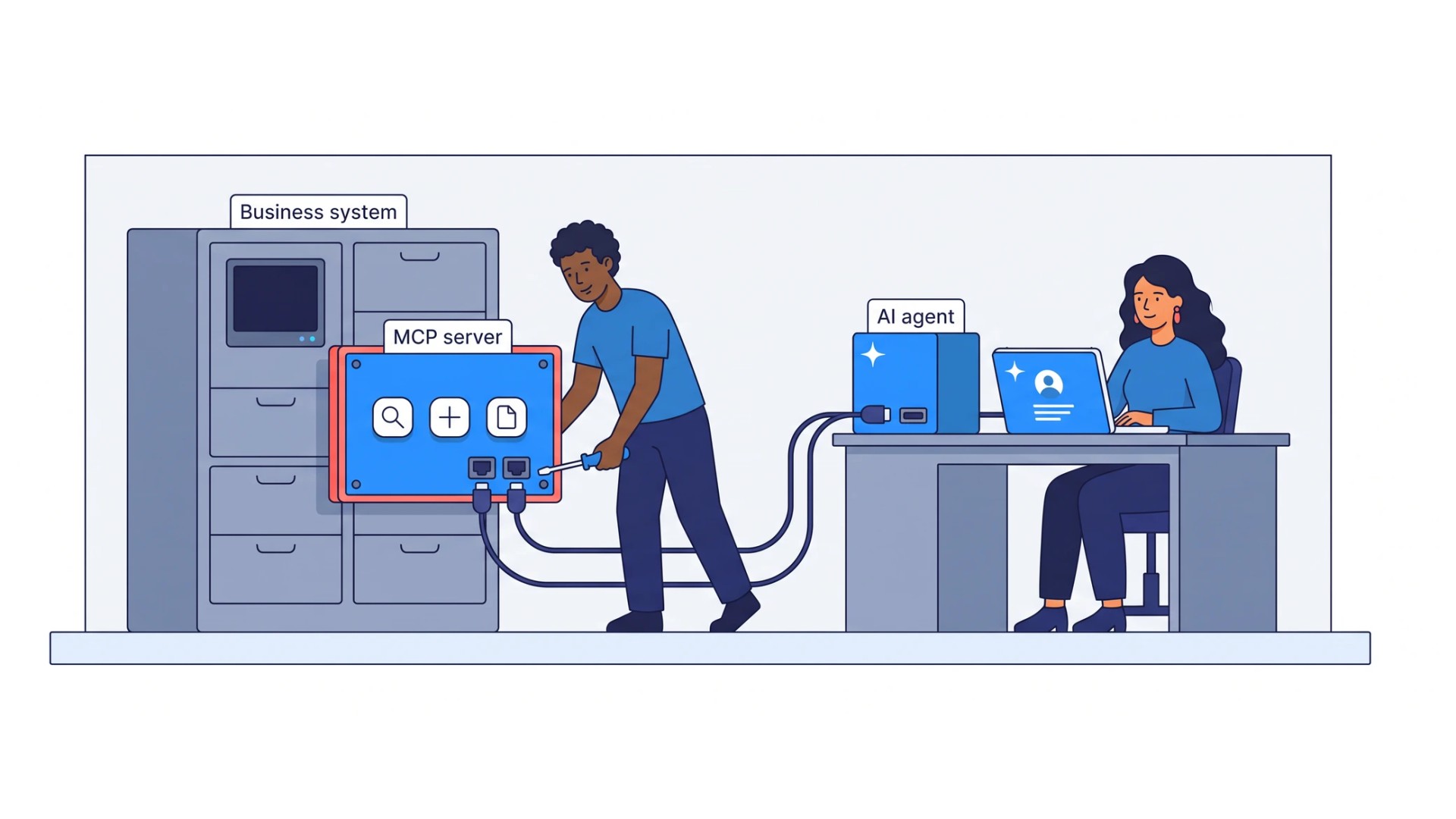
An AI model on its own cannot see today’s orders, open a support ticket or check a stock level. An MCP server closes that gap for one system: it is the interface through which AI reads the system’s data and acts in it. The server describes what the AI may read and do there and carries out the requests the AI makes.
A server can offer three kinds of capability:
- Tools: actions the AI can perform, such as “find customer”, “create ticket” or “check order status”. Each tool has a name, a description of what it does and when to use it, and a defined set of inputs.
- Resources: information the AI can read for context, such as records, files or a database schema.
- Prompts: ready templates for common requests, offered to the person who uses the AI application.
The AI reads the descriptions, decides which tool fits the step it is working on and calls it. The server performs the action in the system and returns the result.
Access is what turns a capable model into automation. An assistant without connections to your systems stays semi-useful: a person still copies data into it and carries its answers back into the applications where the work happens. Connected, the same assistant can update the record, file the request or fill in the transfer form, and the person confirms.
What is the Model Context Protocol?
The Model Context Protocol is an open standard for connecting AI applications to the systems where data lives and work happens. Anthropic introduced it in November 2024. In December 2025 it was donated to the Agentic AI Foundation, a fund under the Linux Foundation co-founded by Anthropic, Block and OpenAI, with support from Google, Microsoft and AWS. The protocol is developed in the open, with a public specification, development kits for the main programming languages and reference servers.
Before a common standard, every pairing of an AI application and a business system needed its own integration. Ten systems and three AI tools meant thirty integrations, each built and maintained separately. With MCP a system is connected once, through its server, and any application that speaks the protocol can use it. Claude, ChatGPT and Microsoft Copilot connect to MCP servers, Google supports the protocol in Gemini Enterprise, and the main developer tools support it too.
For a business this changes the economics of connectivity. The investment goes into the system side, and it keeps its value when you add an AI tool or move to another one.
How an MCP server works: hosts, clients and servers
Three parts take part in every MCP connection:
| Part | What it is | Example |
|---|---|---|
| Host | The AI application a person or an agent works in | Claude, ChatGPT, Microsoft Copilot, a development environment, a custom agent |
| Client | The connector inside the host that holds the connection to one server | One client for each connected server |
| Server | The interface that exposes a system’s data and actions to AI | A CRM, service desk or warehouse server |
A typical exchange runs in four steps:
- Discovery. When the host connects, the client asks the server what it supports and which tools it offers. The server returns each tool’s name, description and inputs.
- Choice. During the work the model reads those descriptions and decides that a step needs, for example, the status of an order.
- Call. The client sends the call with its inputs. The server checks the request, performs it in the system and returns the result.
- Continuation. The model uses the result and moves to the next step.
A local server runs on the same computer as the AI application, often to reach files or tools on that machine. A remote server runs on a network, serves many users and is reached over HTTP, with OAuth recommended for signing in. Business systems that a team shares are usually connected through remote servers.
MCP server examples
Many software vendors now publish MCP servers for their own products, among them GitHub, Microsoft for Azure and Power BI, Atlassian for Jira and Confluence, Salesforce, ServiceNow, Snowflake and Slack. Public directories, including the official MCP Registry, list many more, from vendor servers to open-source projects.
What a connected AI can do through a server depends on the work it supports:
- CRM: find a customer, read the account history, update an opportunity, log a call.
- Service desk: create a ticket, add details, check its status, route it to the right queue.
- ERP and finance: look up an invoice, check whether it was paid, prepare an entry for approval.
- Warehouse and orders: check stock, find the status of an order, change a delivery slot.
- Documents: search a SharePoint library, read a policy, file a document in the right folder.
In each case the AI moves the work to its next step without a person carrying data between screens.
MCP server vs API
An API is the interface a system offers to other software. An MCP server is an interface designed for AI, and in most cases it sits on top of an API, a database or a user interface. The API keeps working underneath.
| API | MCP server | |
|---|---|---|
| Built for | Programmers who write code against it | AI models that choose at run time what to call |
| Describes | Endpoints and data formats | Tools in plain language: what each one does and when to use it |
| Found by | Reading the documentation | Asking the server, which lists its tools |
| Reuse across AI tools | Each AI tool needs its own integration | Any AI application that supports MCP can connect |
The difference that matters most is design. A system can be connected and still be difficult for AI to use. A server that mirrors the full API hands the model dozens of endpoints, large responses and the job of working out which calls to combine. Every unnecessary call costs time and processing and adds a chance of error, and an agent repeats it thousands of times.
Our approach starts from the work. We identify the information and actions the process actually needs and expose them as a small set of well-described tools, with responses in the form the AI will use. MCP is one way to deliver that interface. A REST API, a command line interface or a platform plugin can serve the same purpose, and the choice follows the system and the AI environment.
MCP, RAG, skills and agents: how they fit together
MCP is often compared with other AI terms. Each comparison has a short answer:
- MCP and AI agents. An AI agent pursues a goal and decides what to do next. An MCP server gives it the means to act in a system. The protocol decides nothing itself: it carries the agent’s requests to the system and the results back.
- MCP and RAG. Retrieval-augmented generation finds relevant passages in a knowledge base and gives them to the model. It covers what the business knows: rules, procedures, examples. MCP reaches live records and actions in operating systems. An automated process usually needs both, and an AI knowledge base is built for the first.
- MCP and skills. A skill carries how a piece of work is done: the instructions, the steps and the expected output. A skill that has to read or change a record calls an MCP tool to do it.
- MCP and tool calling. Tool calling is the model’s ability to request a function. MCP standardizes how tools are described, found and called. One server then works with many AI applications.
- MCP and A2A. Agent-to-agent protocols such as A2A let agents exchange tasks with each other. MCP connects an agent with the systems it works in.
Each of these is often sold as the complete answer, and the result is a knowledge base that cannot act or a connector with no defined process behind it. We build them in a fixed order: the process, the knowledge, the connections to systems, and only then the skills, assistants and agents that use all three.
MCP server security and access control
An MCP server gives AI the ability to act in a system, and that ability deserves the same care as any account with access to business data. The main risks are well documented:
- Too much access. A server with broad permissions turns a mistake or a stolen credential into a large problem. The protocol’s security guidance recommends least privilege: start with the minimum and grant more only when an operation needs it.
- Untrusted servers. A local server runs on the user’s computer with that user’s rights, and the specification treats tool descriptions from an untrusted server as untrusted: a hostile server can mislead the model through them. Servers should come from trusted sources and run with restricted rights.
- Misused credentials. A server must accept only credentials issued for it and must never pass a user’s token on to other services.
- Consequential actions. An AI that can move money or change a customer’s terms needs a defined point where a named person approves.
We design the controls before the connector is built. Each connector runs under the system’s own authentication and permissions and exposes only the actions the workflow needs. The AI then has no more access than the account it uses. Sensitive functions are marked as control points that require a named person’s permission, and sensitive results are reviewed before they move on. Where data must not reach a model at all, the workflow keeps it out. The connector keeps an audit trail, runs where you decide and is tested to make sure an exposed agent cannot be turned into a way into your data.
Narrow, reviewed access is what makes automation acceptable to IT and compliance. AI Validation & Control adds the checks on what the AI produces.
When to use an existing MCP server and when to build one
Start with what exists. If the vendor of a system offers an MCP server, or a standard connector covers the actions the process needs, use it. A purpose-built server pays off in four situations:
- No interface for AI. The system is custom, internally developed or old, and offers no MCP server and no usable API.
- Part of the workflow is missing. The vendor server or API covers some actions, and the process needs others it does not expose.
- Generic access is expensive. The standard server returns too much data or needs many calls for one step, and cost and errors grow with volume.
- The work crosses systems. One business step touches several applications, and the AI needs one coherent set of actions across them.
The question to answer first is what the AI must read, update, trigger or complete in the system. The answer shows whether the existing interface is enough.
Can AI connect to legacy systems with no API?
Yes. A system without an API still has a way in: its web interface, its database, its files and storage, or direct integration with the application. We build access through whichever of these fits the system and expose only the information and actions the workflow needs.
In one current project, a warehouse system offers nothing but a web interface. We are building an API and an MCP server over that interface. AI will then read the system’s data and perform simple actions in it, through the same screens a person uses today.
Replacing an established system to make it reachable by AI can turn adoption into a major IT program. Connecting it takes engineering, and it is the shorter path when the system works well and only its connectivity is missing.
How to build an MCP server for a business system
Building an MCP server is ordinary software development, and official development kits exist for the main programming languages. The hard part is the design, and it starts from the process:
- Analyze and model. Understand the business process and list what AI must read, update, trigger or complete. Assess the systems involved, their interfaces, constraints and operating environment.
- Design. Decide which capabilities to expose and how. Give each tool a clear name, a description that tells the model when to use it, explicit inputs and a response shaped for the next step. A few well-defined tools serve an agent better than a long list.
- Build and test. Implement the server on the technology that suits the environment, such as .NET, Java, Node.js, Python or Go. Verify it with automated functional and non-functional tests against the AI interactions it is meant to support.
- Package and deliver. Deliver it the way your organization runs software: as source code for your team, as a ready-to-deploy package, deployed in your environment or operated as a managed service.
The server is also tested with the AI it serves: on real tasks, does the model choose the right tool, pass correct inputs and use the result? A tool with an unclear description fails here even when its code is correct.
How EIC builds AI connectivity
AI Connectivity gives AI direct access to the data and actions it needs across legacy, custom and modern business systems. We start from the business process, define the interactions the automation requires and build the connector around them, through MCP, REST, a command line interface or an embedded integration, on your technology stack. You receive the connector design brief, the tested connector, its documentation and, where the connector is custom, the source code.
The connector is the mechanism. AI execution is the goal. The same connector serves the next assistants, agents and orchestrators that need the system. Short answers to the questions buyers ask about MCP and AI integration are in the FAQ on the AI Connectivity page.